Changing your plan
Upgrade or downgrade your subscription, and add brands or user seats.
You can change your plan at any time from your account’s Subscription area. See pricing for the available plans.
Update your subscription
- Go to your account and open Subscription.
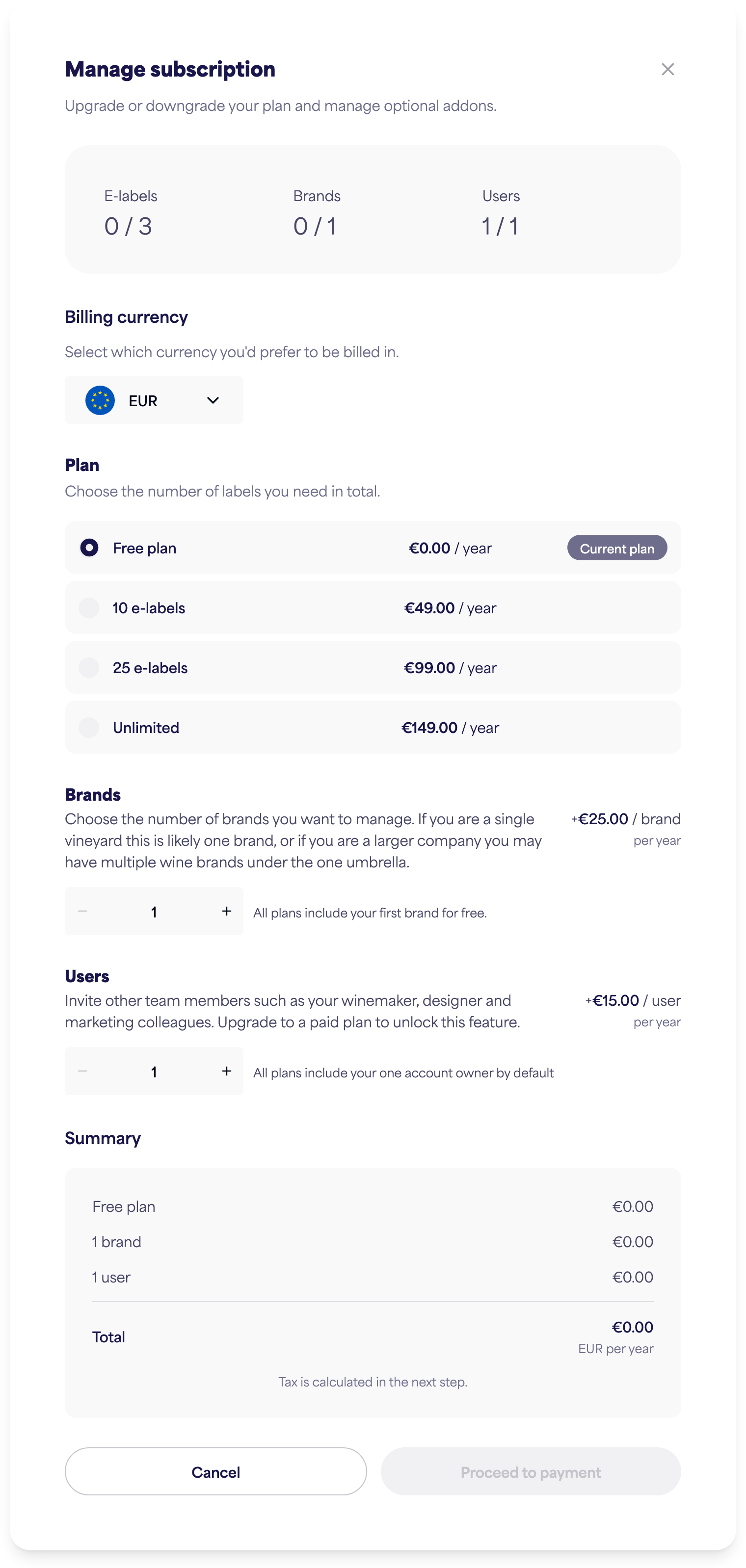
- Click Update subscription to open the Manage subscription dialog.
- Choose:
- Plan — the total number of e-labels you need.
- Brands — how many brands you want to manage (your first is free).
- Users — additional seats for team members. Your account already includes one seat for yourself; add more here if you want to invite others.
- Review the Summary, then Proceed to payment to confirm.
Note: Currency can only be set when you first subscribe. Once you’re on a paid plan, the billing currency is fixed and can’t be changed.
Proration
When you upgrade mid-cycle, your plan is pro-rated — you only pay for the new features from today, with credit applied for what you’ve already paid. The dialog shows the amount due today and your next automatic renewal.
Downgrading
If you downgrade below what you’re currently using, you’ll be asked to make room first:
- Brands — you must delete brands to go below your current count.
- Users — you must remove team members before reducing seats.
- E-labels — you must delete labels to go below your new limit.